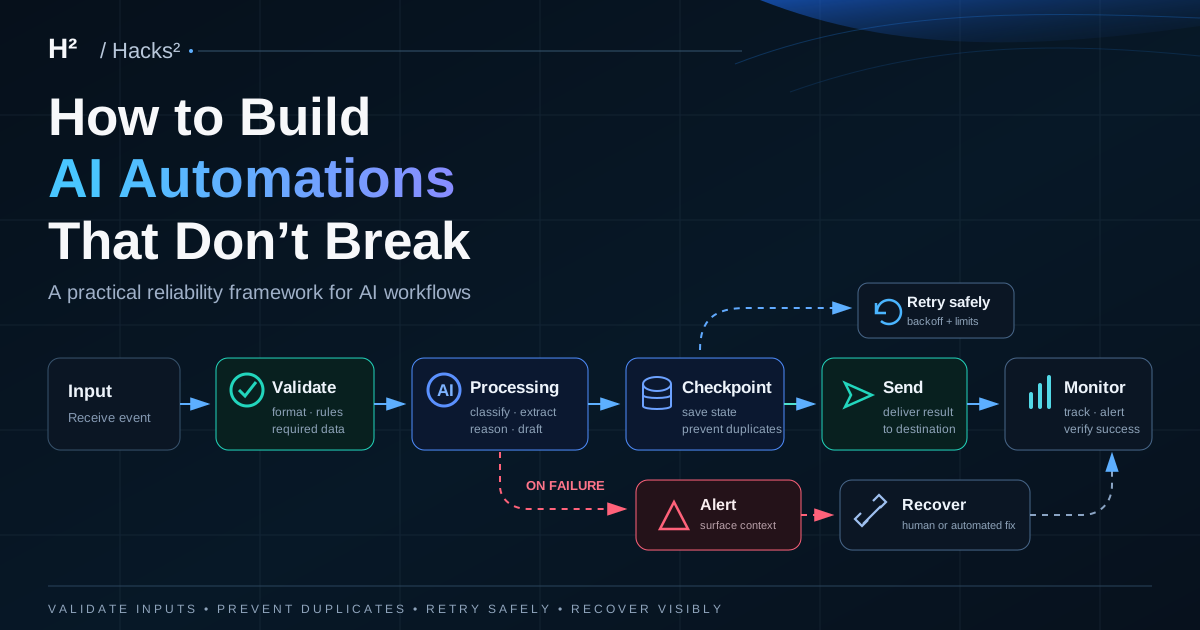
The easiest AI automation to build is the happy path.
A form arrives. AI classifies it. A record is created. An email is sent. The demo works.
Then production starts.
A webhook fires twice. An API times out after accepting the request. A model returns malformed JSON. A customer email is missing. A payment is valid, but the delivery step fails. The workflow retries and accidentally performs the same side effect twice.
The difference between a clever automation and a useful operating system is not how well it works when everything goes right. It is how safely it behaves when something goes wrong.
This guide is a practical framework for building AI automations that can survive real work.
Start with a failure contract
Before adding another AI step, write down what must happen when the workflow cannot complete normally.
A good failure contract answers five questions:
- What counts as success?
- Which failures are safe to retry automatically?
- Which failures must stop the workflow?
- What information must be saved before anything stops?
- Who gets alerted, and how can the run be recovered?
For a digital-product delivery workflow, success is not “the payment webhook arrived.”
Success is closer to:
A verified paid order was matched to the correct product, the delivery was sent exactly once to a valid customer address, and the outcome was recorded.
That definition changes the architecture.
The five failure modes to design for
Most production automation failures fit into five buckets.
1. Bad input
Required data is missing, malformed or inconsistent.
Examples:
- no customer email;
- an unexpected currency;
- an unsupported file type;
- a webhook with the wrong event type.
Do not ask AI to “figure it out” when the workflow already knows the input is invalid. Validate deterministic rules first.
2. Temporary dependency failure
An external service is unavailable, rate-limited or slow.
Examples:
- an API returns 429 or 503;
- a mail provider times out;
- a database connection temporarily fails.
These are usually good retry candidates — but only with limits.
3. AI output failure
The model responds, but the result cannot be trusted or parsed.
Examples:
- invalid JSON;
- a required field is missing;
- confidence is below your threshold;
- the answer conflicts with known source data.
Treat model output as untrusted input. Validate it before the next consequential step.
4. Side-effect ambiguity
The workflow does not know whether an action happened.
This is one of the most dangerous cases.
Imagine an email API times out. Did the provider send the message before the timeout, or not? Blindly retrying can send the email twice.
The same problem applies to invoices, CRM updates, file creation and payment-related actions.
5. Silent success
Every technical step returns “OK,” but the business outcome is wrong.
The file link is expired. The wrong product was delivered. AI categorized a lead incorrectly. A record was created in the wrong account.
Technical success is not business success. You need business-level checks too.
Reliability rule #1: validate before AI
Put deterministic checks before expensive or probabilistic steps.
For example:
webhook
  ↓
validate event type
  ↓
validate required fields
  ↓
verify product / customer / status
  ↓
AI step, only if reasoning is actually needed
This reduces cost, removes avoidable ambiguity and makes failures easier to diagnose.
AI should handle fuzzy work such as classification, extraction from messy text, prioritization or drafting. It should not replace a simple rule like “email must exist.”
Reliability rule #2: give every run an idempotency key
A reliable workflow needs a stable identifier for the business event it is processing.
Good keys include:
- payment event ID;
- order ID;
- form submission ID;
- ticket ID;
- source document ID plus version.
Before performing a side effect, check whether that key has already completed the action.
A minimal state table might look like this:
| event_key | status | last_step | attempts | completed_at |
|---|---|---|---|---|
| order_123 | delivered | send_email | 1 | 2026-10-17T10:42Z |
| order_124 | needs_review | validate_email | 1 | — |
Now a duplicate webhook becomes boring:
We have already completed
order_123. Stop safely.
That is exactly what you want.
Reliability rule #3: retry the failure, not the entire business event
Retries are useful only when they are bounded and targeted.
A temporary 503 from an API may deserve another attempt. A missing customer email does not.
Use three classes:
Retryable
- rate limits;
- transient network errors;
- temporary provider outages.
Non-retryable
- invalid input;
- authentication or permission errors;
- missing required business data.
Ambiguous
- timeouts after a side effect may already have happened.
For retryable errors, use a small maximum attempt count and increasing delays. Do not create an infinite loop.
For ambiguous errors, check the destination system before repeating the action.
Reliability rule #4: make the platform’s recovery tools part of the design
The major automation platforms already provide useful recovery primitives. Use them deliberately instead of treating error handling as an afterthought.
Make supports dedicated error handlers, including retry, resume, commit, rollback and skip patterns. It can also store incomplete executions so a failed scenario can be resumed rather than rebuilt from memory. See the Make error-handling documentation.
n8n keeps execution history and lets operators retry failed workflows using either the current saved workflow or the original version. That makes a documented recovery path much easier to operate. See n8n execution recovery.
Zapier supports custom error handling and replay mechanisms, including Autoreplay for temporary failures on eligible plans. See Zapier error handling.
The important point is not which platform has the longest feature list. It is whether your workflow has a known recovery path before production.
Reliability rule #5: save checkpoints before consequential actions
Do not let the workflow exist only inside execution logs.
Before an irreversible or customer-facing action, persist enough state to answer:
- what event are we processing?
- what did we verify?
- what decision did AI make?
- what is about to happen?
- has it already happened?
A useful pattern is:
receive event
  ↓
validate
  ↓
save: verified
  ↓
prepare output
  ↓
save: ready_to_send
  ↓
perform side effect
  ↓
save: completed
If the workflow crashes, the state tells you where recovery should begin.
Reliability rule #6: put human approval where mistakes are expensive
Human-in-the-loop does not mean a person must approve everything.
It means the workflow knows which cases deserve escalation.
Useful approval triggers include:
- low-confidence AI classification;
- a value above a financial threshold;
- a customer-facing commitment;
- conflicting source data;
- a new or unknown exception;
- an action that cannot be cleanly reversed.
The automation should prepare the evidence for the reviewer, not just send “workflow failed.”
A useful review message contains:
- event or order ID;
- failure reason;
- relevant source data;
- proposed next action;
- a safe replay or resolution path.
Reliability rule #7: alert on business failure, not every technical wobble
If every retry sends an alert, people learn to ignore alerts.
Notify a human when:
- retries are exhausted;
- the workflow reaches
needs_review; - a critical side effect is ambiguous;
- the same failure pattern repeats unusually often;
- the business outcome has not completed within an expected time.
The goal is not maximum observability noise. It is actionable visibility.
A reference architecture for paid digital delivery
A small paid-product workflow is a useful reliability test because failure touches both money and customer trust.
A robust version looks like this:
payment event
  ↓
verify paid status + product + environment
  ↓
derive event_key
  ↓
already completed?
  ├─ yes → stop safely
  └─ no
       ↓
validate customer email
       ↓
record verified state
       ↓
fetch approved delivery asset
       ↓
prepare delivery message
       ↓
send
       ↓
record provider result
       ↓
mark completed
       ↓
weekly exception review
Add a separate failure route:
failure
  ↓
classify
  ├─ retryable → bounded retry
  ├─ invalid → needs_review
  └─ ambiguous side effect → verify destination first
This is less glamorous than adding another agent.
It is also much closer to a system you can trust.
What AI should and should not decide
A useful production rule is:
Use AI for judgment. Use deterministic logic for control.
AI can be good at:
- extracting intent from messy text;
- classifying a request;
- summarizing evidence;
- drafting a response;
- suggesting the next action.
Deterministic workflow logic should usually control:
- permissions;
- payment state;
- allowlists;
- duplicate prevention;
- retry limits;
- monetary thresholds;
- final send/publish rules;
- completion status.
Do not let model confidence become your only safety mechanism.
The minimum reliability dashboard
You do not need enterprise observability to run a dependable small-business automation.
Track five numbers:
- Completion rate — percentage of eligible events that reach the business outcome.
- Automatic recovery rate — failures recovered without human intervention.
- Manual review rate — how often a person must step in.
- Duplicate side effects — target: zero.
- Time to recovery — how long failed work waits before resolution.
If an AI step is expensive, add cost per successful completion.
This turns reliability into something you can improve instead of something you only notice when a customer complains.
Production checklist
Before switching a workflow from experiment to operations, confirm:
- Required input is validated before AI runs.
- Every business event has a stable idempotency key.
- Duplicate events stop safely.
- Retryable and non-retryable errors are separated.
- Retries have limits and delays.
- Ambiguous side effects are verified before replay.
- Important state is stored outside transient logs.
- High-consequence decisions have a human fallback.
- Exhausted failures create an actionable alert.
- There is a documented replay or recovery procedure.
- Business completion is measured, not just technical execution.
- One person can explain how to recover a failed run.
If you cannot check the last box, the workflow is not operational yet.
Build boring systems first
The best AI workflow is not the one with the most agents, tools or branches.
It is the one that can answer four questions at any moment:
What happened? What should have happened? Is it safe to retry? Who owns the exception?
If you are still choosing your first automation, start with AI Automation for Small Business. If you already have working experiments and want to turn them into repeatable operating systems, the AI Business Operations Pack provides reusable structures for doing exactly that.
Build the happy path once.
Design the failure path before you scale it.
Start small.
Make it repeatable.
- Input: Define the job, audience, constraints and source material.
- Draft: Use AI for structure and options, not the final unchecked answer.
- Review: Check facts, judgment, tone and the consequence of a mistake.
- Deliver: Put the useful output where work actually happens.
- Learn: Record what improved, failed or should change next time.
Make the workflow yours.
Get the H² AI Workflow Starter Pack: five practical systems, prompts and decision frameworks to turn useful AI ideas into repeatable work.
Get the free Starter Pack ↘Ready to make it
operational?
The AI Business Operations Pack turns the core workflow into six reusable systems, prompts and templates for small-business operations.
Explore the €29 Operations Pack ↗